
iButton
iButton ("touch memory", in the CIS often called таблетка) is a key in a small steel can that is read by touching it to a reader. Most of them speak Dallas 1-Wire; intercom systems also use Cyfral and Metakom keys. Flipper Zero can read, save, emulate and write these keys.
Hardware
The iButton module is a contact pad with three spring-loaded pogo pins on the iButton PCB.
- The two outer pins are data (connected to GPIO pin 17), the middle pin is ground.
- Reading / writing a key: the key touches the flat part of the pad — left data pin + middle ground pin.
- Emulating to a reader: the protruding part of the pad touches the reader — right data pin + middle ground.
- If the ground can't reach a reader's rim, use two wires: GPIO 17 (data) and GPIO 8, 11 or 18 (ground).
Main menu
Main Menu → iButton:
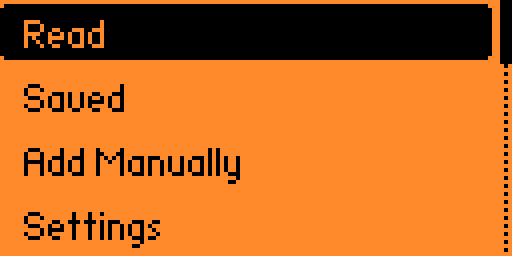
| Item | What it does | Page |
|---|---|---|
| Read | Detect the key type and read its ID (and memory for DS1992/1996/1971) | Reading |
| Saved | Browse /ext/ibutton/ — emulate, write, edit, rename, delete | Reading, Writing |
| Add Manually | Create a key from protocol + hex ID | Add manually |
| Settings | Write Blanks — which blank types a write may target | Writing |
Unleashed
Compared to the official docs, Unleashed has a Settings → Write Blanks page (RW1990.1, RW1990.2, TM2004, TM01x), shows which blank is being tried during a write and which one took it, writes Cyfral and Metakom keys to TM01x blanks, and supports DS1420. The ReadMe also lists an iButton Fuzzer plugin.
Pages in this section
- Reading keys — read, save, emulate, CRC errors.
- Writing to blanks — RW1990, TM2004, TM01x; Write ID vs Full Write on Same Type.
- Adding manually — create keys from an ID.
- Supported protocols — Dallas DS1990/1992/1996/1971/1420, generic 1-Wire, Cyfral, Metakom.
- Fuzzer — what the firmware ships for the iButton fuzzer app.
- File format —
.ibtnfiles.
Files
| Path | Contents |
|---|---|
/ext/ibutton/*.ibtn | Saved keys (default name prefix iBtn) |
/ext/ibutton/.ibutton.settings | Write Blanks setting |
WARNING
Copy and emulate only keys you own or are authorised to test.