
125 kHz RFID
Low-frequency (LF) RFID is the "proximity" technology used in cheap access cards and key fobs, intercom tags, some parking and gym systems, and animal microchips. These tags usually broadcast a fixed ID with no cryptography, which is why they are easy to read, emulate and clone.
Flipper Zero has a 125 kHz antenna on its back (on the dual-band antenna, next to the 13.56 MHz NFC coil), driven by the STM32WB55 MCU. With it the Flipper can read, save, emulate and write LF tags.
Unleashed
The 125 kHz RFID app is the official firmware's. On top of it, the Unleashed build has:
- a Settings → Write Chips menu: besides T5577 it can write EM4305 and Hitag Micro clones (8265, 8210, H5.5), plus an opt-in 8268 (Hitag S) target. The write screen shows which chip is being tried and which one took the write;
- Write and set password for T5577 blanks;
- extra Add Manually formats (enter facility code / card number instead of hex, HID H10304/H10302/S10401/H10306/ Corp1000-35, Casi-Rusco), DEZ 8 / DEZ 10 display for EM4100;
- a third read pass at 134.2 kHz for animal tags, and a dedicated Read FDX-B (Animals) mode;
- the bundled T5577 app (read/edit/restore blocks, test, wipe, clear and sniff passwords).
Main menu
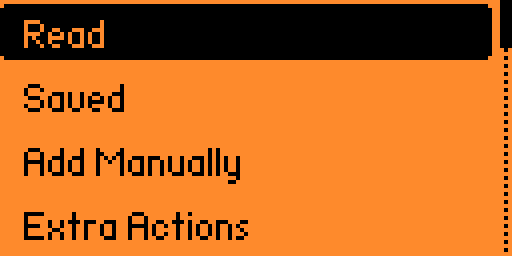
Main Menu → 125 kHz RFID opens a menu with these items (exact labels from the firmware):
| Item | What it does | Page |
|---|---|---|
| Read | Auto-detect and read a tag (ASK → PSK → 134 kHz cycle) | Reading tags |
| Saved | Browse /ext/lfrfid/ — emulate, write, edit, rename, delete saved keys | Reading tags, Writing |
| Add Manually | Create a key from its protocol and ID | Add manually |
| Extra Actions | Read with a fixed modulation (ASK, PSK, FDX-B); RAW read/emulate in Debug mode | Reading tags, RAW |
| Settings | Write Chips — which blank types a write may target | Writing |
Pages in this section
- Reading tags — read, save and emulate LF tags; reading with a fixed modulation.
- Writing to blanks — which blanks work (T5577, EM4305, Hitag Micro, 8268), write chips setting, writing with a password, error messages.
- Adding manually — every protocol of Add Manually and the FC/ID input formats.
- Supported protocols — full protocol table: modulation, data size, decoded fields, write support.
- Animal microchips — FDX-B / FDX-A pet chips.
- T5577 and Hitag Micro (by @gromovyna) — the H5.5 / 8265 / 8210 story, write UX, T5577 wipe.
- T5577 app — block-level read, edit, restore, test, wipe, clear password, sniff password.
- RAW recording — record raw ASK/PSK signal for protocol research.
- Fuzzer — what the firmware ships for the RFID fuzzer app.
- File formats —
.rfid,.t5577and.rawfiles.
Where the files live
| Path | Contents |
|---|---|
/ext/lfrfid/*.rfid | Saved keys |
/ext/lfrfid/*.t5577 | T5577 block dumps (opened by the T5577 app) |
/ext/lfrfid/*.ask.raw, *.ask134.raw, *.psk.raw | RAW recordings |
/ext/lfrfid/.lfrfid.settings | Write Chips setting |
/ext/lfrfid/assets/t5577_dict.lfrfid | T5577 password dictionary (overwritten on update) |
/ext/lfrfid/assets/t5577_dict_user.lfrfid | Your own T5577 passwords |
/ext/lfrfid/assets/iso3166.lfrfid | Country names for FDX-B chips |
WARNING
Clone and emulate only tags you own or are authorised to test.