NFC
Flipper Zero has a built-in 13.56 MHz NFC module that can read, save, emulate and, for some card types, write high-frequency cards: access cards and fobs, transport cards, hotel keys, NFC stickers, amiibo-style toys and bank cards (public data only). Data is stored on the microSD card in /ext/nfc/ as .nfc text files.
Insert a microSD card
The NFC app keeps its dictionaries, parsers and saved cards on the microSD card (/ext/nfc/). Update the firmware with the SD card inserted so the resources (key dictionaries, assets/*.nfc, parser plugins) get installed.
Hardware
- ST25R3916 NFC front-end chip, responsible for both reading and emulation.
- A 13.56 MHz antenna on the dual-band RFID antenna board on the back of the device, next to the 125 kHz antenna. Hold cards against the centre of the back of the Flipper.
NFC menu
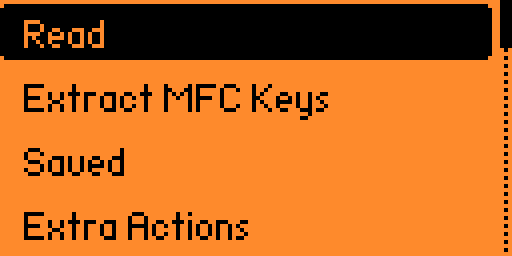
Main Menu → NFC opens this menu (labels exactly as on the device in Unleashed):
| Item | What it does |
|---|---|
| Read | Detects the card type and reads everything it can, including the MIFARE Classic key attacks. See Reading cards. |
| Extract MFC Keys | Emulates a MIFARE Classic card to collect nonces from a reader (MFKey32). See MFKey32. |
| Saved | Your saved .nfc files: emulate, write, unlock, rename, delete. |
| Extra Actions | Read a specific card type, manage key dictionaries, unlock NTAG/Ultralight and SLIX-L. |
| Add Manually | Generates a blank virtual card or an NFC-A card from a known UID/ATQA/SAK. See Adding cards manually. |
| Debug | Only visible with Debug mode on (Settings → System → Debug). |
Extra Actions contains:
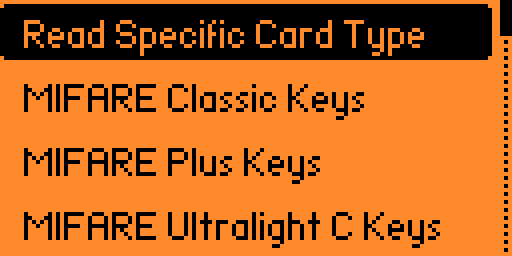
- Read Specific Card Type: skip auto-detection, useful for hybrid cards.
- MIFARE Classic Keys, MIFARE Plus Keys, MIFARE Ultralight C Keys, MIFARE UL AES Keys: view the system/user dictionary counters, Add a key, or List (and delete) user keys.
- Unlock NTAG/Ultralight: generate or enter a password before reading. See Unlocking cards.
- Unlock SLIX-L: password unlock for ICODE SLIX-L tags.
Unleashed
NFC is the official firmware's app — its reader, emulator and most card parsers. On top of that, Unleashed adds, among other things: an extended MIFARE Classic system dictionary (4000+ keys), MIFARE Plus SL3 reading with AES key dictionaries, MIFARE Ultralight AES support, Texkom intercom keys, Add Manually for MIFARE Classic with a custom UID and for MIFARE Plus, Save Keys to Dictionary from a dump, the CUID (per-card) dictionary with a loading progress bar, and many extra card parsers (Troika, Plantain, Umarsh, Zolotaya Korona, Kazan, Metromoney, Moscow Social Card, PPK tickets and more).
Basics
| Term | Meaning |
|---|---|
| UID | Card serial number, 4 or 7 bytes (10 on some). Factory-burned on genuine cards. |
| ATQA / SAK | Answer bytes during anticollision that hint at the card type (e.g. SAK 08 = MIFARE Classic 1K). |
| Sector / block | MIFARE Classic memory unit: 16 bytes per block, 4 blocks per sector (16-block sectors at the end of a 4K). |
| Page | Ultralight/NTAG memory unit, 4 bytes. |
| Key A / Key B | 6-byte Crypto-1 keys protecting each MIFARE Classic sector. |
| Nonce | Random number exchanged during authentication. Collected nonces let you compute keys offline. |
| Magic card | A blank with a writable UID/block 0. See Magic cards. |
Pages in this section
Everyday use
- Reading cards: read, save, emulate; which card types are supported and what you get from each.
- Adding cards manually: generate virtual cards, create an NFC-A card from UID/ATQA/SAK.
- Supported cards (parsers): transport, access and toy cards Flipper can decode.
- Bank cards (EMV): what is read from a bank card and why it cannot be cloned.
- Unlocking cards with passwords: NTAG/Ultralight passwords, Ultralight C keys, SLIX-L.
MIFARE Classic and key recovery
- MIFARE Classic: dictionaries, sectors, the full reading flow, emulation and writing.
- MFKey32: keys from the reader: collect nonces from a reader, recover keys.
- Nested attacks and Fudan backdoors: card-only attacks built into
Read. - The MFKey app: recovering keys on the Flipper itself (MFKey 4.1).
- Fast key recovery with qUnleashed: all attacks on your phone or PC.
Blanks and cloning
- MIFARE Classic magic cards: Gen1/Gen2/Gen3/Gen4, CUID, FUID, USCUID, UMC and local names.
- NFC Magic 2.0: writing and wiping magic MIFARE Classic and Ultralight/NTAG blanks.
Other card families
- MIFARE Ultralight AES: AES-protected Ultralight (MF0AES20), keys, write-back, secure messaging.
- MIFARE Plus: how S/X/SE/EV1/EV2 and the security levels are detected, SL3 AES keys.
Access systems (by @gromovyna)
Reference
- NFC file format: the
.nfcfile layout and dictionary formats.
Legal
Work with your own cards or with explicit permission. Copying access credentials or transport tickets you don't own may be illegal.
MIFARE, MIFARE Classic, MIFARE Ultralight, MIFARE Plus, MIFARE DESFire, NTAG and ICODE are trademarks of NXP B.V. FeliCa is a trademark of Sony Corporation.